Free browser extension
See if an Early Access game is still being updated, right on Steam.
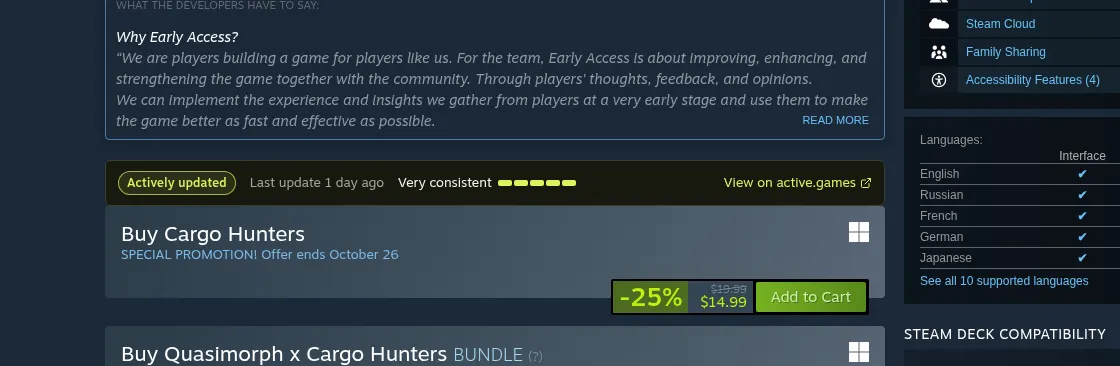
Before you buy, check whether the developers are still actively updating their game. The extension adds one small box to Early Access store pages with the update status, the last update, and how consistently the game gets updated.
Free · No tracking · No account · Only runs on store.steampowered.com
How it works
- 1
Install it
One click from your browser's add-on store. There's nothing to set up and nothing to sign in to.
- 2
Browse Steam like normal
Open any Early Access game. A small box shows up right under Steam's Early Access notice.
- 3
Know before you buy
See if it's still active, when it last updated, and how consistently. Click through for the full history.
- Free, forever
- No tracking or analytics
- No account
- No popups, one permission
FAQ
Does it cost anything?
No. The extension is free, and so is everything on active.games.
What does it collect about me?
Nothing. It only asks active.games about the game you're looking at, by its Steam app ID. No browsing history, no cookies, no account, no analytics.
Which browsers does it work in?
Chrome and Firefox. Other Chromium browsers that install from the Chrome Web Store, like Brave, should work too.
Why don't I see the box on some games?
It only appears on games listed on active.games, which covers Steam Early Access. If a game isn't listed yet, the extension stays out of the way and adds nothing.
Where does the update data come from?
Steam's public update history and patch notes, checked every day. The consistency rating looks at how regularly a game has shipped updates over the last 12 months.
What permissions does it need?
Only storage, so it can remember results for a few hours instead of asking again. It runs on store.steampowered.com game pages and nowhere else.
More detail is in the privacy policy. Questions or a bug? Get in touch.